Pages

Friday, August 22, 2014

A view of IBM Integration Bus runtime

If you are searching information on the components that IBM Integration Bus is composed of or just would like to know the terminolgy used (i.e. what is an Integration Node, an Integration Server, a message flow, ...) this post is for you !

I don't have the intention to explain every runtime components but rather provide enough information to understand the main components and the processes that are running.

First all, the IBM Integration Bus is a standalone application that is not running on a J2EE environment.
The runtime architecture provides a very strong resilience against failure and scalability capability.The core engine is very efficient and provides high performances with limited ressource usage. 
It can be easily deployed in a development workstation (development toolkit and runtime) without requiring a ferrari: I usually do demos (that includes IIB but DB2 as well) using a standard laptop having 4GB RAM.

The following figure describes the IBM Integration Bus runtime:
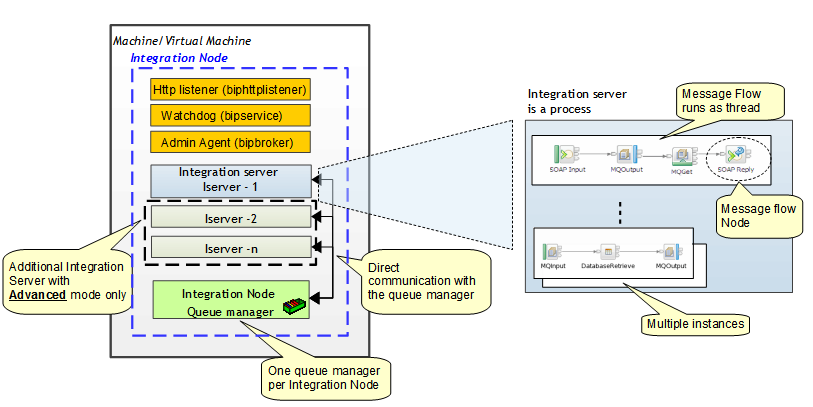
An integration node is composed by different processes and one queue manager. Note that in the former version of the Integration Bus, WebSphere Message Broker, the term IBM Integration Bus was called "Broker".
There are two kind of Integration node processes: those use to run the flows called Integration Servers  and those use for Integration Bus internal tasks.
The internal tasks processes are:
  • TheIntegration Node wide listener, the "biphttplistener": this process is a http listener and it is started when the Integration node is configured to receive http request (http://www-01.ibm.com/support/knowledgecenter/SSMKHH_9.0.0/com.ibm.etools.mft.doc/bc43700_.htm?cp=SSMKHH_9.0.0%2F1-11-1-5-1-3-0-0&lang=en). It is started if the Integration node has been configured to have a Integration Node wide listener.
  • The “watchdog” process, the "bipservice": it is a very small process that monitors (and restarts if necessary) the Admin Agent (bipbroker process).
  • The Admin Agent (process name = bipbroker): this process is designed to monitor and administrate the Integration Servers. It performs such functions as handling deploy requests and restarting any Integration Servers that would stopped for unexpected reason. It does not process any message flows, but its size is governed by the size of the deploy requests that are being received.
The Integration servers are the processes where message flows are deployed and run. The name of the corresponding process is "dataflowengine". Message flows deployed in an Integration Server run as Threads.
Integration Servers are processes that are created by an administrator. 
IBM Integration Bus is proposed in different editions: express, standard and advanced. In the express and standard edition, only one Integration Server can be attached to an Integration Node.
All the integration servers within the same Integration Node use the same unique queue manager, the Integration Node queue manager. It is used as well to store eventual internal information as to get or put MQ messages processed by message flows.
The Integration Node queue manager is a standard WebSphere MQ Queue manager and can be administrated as any other queue manager. Even though it can be integrated into a WebSphere MQ network, using a MQ cluster or channels, and accessed by applications as a normal WMQ queue manager (using client connections for example), the usage of the Integration Node Queue Manager is restricted from a license point of view:it can process MQ messages as long as it is processed in one way or another by a message flow deployed on the Integration Node.
A message flow can be deployed on one or multiple Integration Servers. A number of instance of the message flow (corresponding to a number of threads) can be defined  on each Integration Server where it is deployed. Different message flows can be deployed on the same Integration Server.
Finally a message flow is composed by multiple message flow nodes (MQInput, MQOutput, SOAPInput, …) that are wired together.

Thursday, August 21, 2014

IBM Integration Bus licensing principle on distributed explained

CPU Licensing principle for Distributed

Proper license has to be acquired in order to use IBM Integration Bus in a licensed environment.
The license agreement is related to the number of CPUs used by the IBM Integration Bus (IIB).
The number of CPUs used depends on the environment where the IBM Integration Bus is installed as the following figure shows:

If the IBM Integration Bus is installed on a non virtualized machine then the number of CPUs to take into consideration for license point of view is the total number of CPUs installed on that machine.
In a x86 virtualized environment, it is possible to allocate a variable number of CPUs to a virtual machine. In this environment the IIB is running in a virtual machine and the number of CPU to take into account for a license point of view is the number of virtual CPU allocated to this virtual machine with a maximum set to total number of physical CPU. This mean that if IIB is running in only one virtual machine having one virtual CPU, the number of CPU to take into account for the license will be 1 even though this virtual CPU is mapped to a physical CPU that is shared with other virtual machines. In the same way, if IIB is running in two virtual machines sharing the same physical CPU, each virtual machine having 1 virtual CPU mapped to the same physical CPU, the number of CPU to take into account for the license will be 2.
In a Power/ZSeries, it is possible as in the distributed environment to allocate a variable number of CPUs to a LPAR. However in this environment it is possible to share a CPU between LPARs with the restriction that a minimum of one CPU has to be taken into consideration for the license point of view. If we take the same example used above in the x86 environment then if IIB is running in only one LPAR having a micro partition of CPU, meaning that the LPAR is sharing the physical CPU with other LPARs, the number of CPU to take into account for the license will be 1. However if IIB is running on two LPARs sharing the same physical CPU, then the number of CPU to take into account for the license will still be 1.

IBM Integration Bus Editions Licensing

There are three mains edition available for IBM Integration Bus: express, standard and advanced.
The express edition targets customers that have a basic set of features and have only low capacity requirements. In this mode only a subset of message flow nodes can be used and only one Integration Server can be created by Integration Node. The available subset of nodes can be found at the following link (http://www-01.ibm.com/support/knowledgecenter/SSMKHH_9.0.0/com.ibm.etools.mft.doc/an67720_.htm?lang=en)
In the Standard Edition all the message flow nodes can be used (except the decision service node used to execute business rules and that requires specific entitlements). The limitation in this mode is that only one Integration Server can be created by Integration Node. The license doesn't restrict however the number of integration nodes.
In the Advanced Edition there are no limitation on the number of Integration Server per Integration Node. The restriction on the decision service remains.
The following figure shows this principle for the Standard and Advanced Edition:
Please note that this is my point of view and I am speaking for myself and not on behalf of IBM.


Thursday, May 15, 2014

ActiveMQ & IIB with JMS

In this topic I will give you some hints on how to connect your IBM Integration Bus to a JMS provider ActiveMQ.
The following link is very useful:
http://www.ibm.com/developerworks/websphere/library/techarticles/1211_eswarachary/1211_eswarachary.html
There are however few information concerning the configuration.
I provided here after some extra informatio.

Configuration

Runtime configuration

In the MQ Explorer, select the "JMSProviders/ActiveMQ" configurable service  of the Integration node you want to use.


 The default_Path refers to the shared class directory of the IBM Integration Node.

 The jars of ActiveMQ have to be placed into a directory.
I usually place them in a dedicated directory under the homePath of the IIB Node which on windows is "C:\ProgramData\IBM\MQSI".
You can know the path using following command and look for "Local Work Path":
mqsiservice INodeName


Jar file

In order to be able to access activeMQ, the integration node needs the JMS provider jar file and place them in a location accessible to the node. I found convenient to copy the activemq-all.jar file only.

JNDI Bindings
In order to retrieve the connection factory, the Integration node needs to have a JNDI.
A default JNDI is provided with ActiveMQ: org.apache.activemq.jndi.ActiveMQInitialContextFactory

The jndi objects configuration can be found at the following link:
http://activemq.apache.org/jndi-support.html

You need to make this configuration file, the jndi.properties file, accessible to the IntegrationNode.
As explain at the link:
"
Once you have the jndi.properties edited and ready, it needs to be accessible to your application. The easiest way is to add jndi.properties to a jar file. When "new InitialContext()" is called, it will scan the resources and find the file.
 "
So place the file in a jar file - I just created a zip file, placed the property file in it and renamed the extension to "jar" - and place the jar file in the directory where you put the activemq jars.

In my configuration I have:


And in this directory I have the activemq.jar as well as another jar that contains my file "jndi.properties".

The content of my jndi.properties is:

java.naming.factory.initial=org.apache.activemq.jndi.ActiveMQInitialContextFactory
java.naming.provider.url=vm://localhost
connectionFactoryNames=connectionFactory, queueConnectionFactory, topicConnectionFactory
queue.jmsINQ=IN.Q
queue.jmsOUTQ=OUT.Q

There is a default connection factory "connectionfactory" and two queues.
The jndi name for the queue IN.Q defined on ActiveMQ is "queue.jmsINQ". The queue is accessed from the node using the alias name "jmsINQ" (without queue).

IIB Node configuration

Node configuration

The JMS Provider name on the JMSInput node is using a configurable service.
If the corresponding runtime configurable service property is not changed (let the defaulr), the property on the node will be used.
If you change the default property value on the conf. service then this property will be used.


Here is the configuration of my input node:


The connection factory "connectionfactory" is the one by default and defined in the jndi.properties.
And in the "basic" tab of the node, I put the alias name defined in the jndi properties file: jmsINQ for the input.


That's it !!

Testing

If you go on active MQ -> admin -> connections
you will see your connection.
Message can be send from ActiveMQ using the "send" tab.


Pretty Print in blogger

Pretty Print in blogger

 I was looking to provide a better way to render code in my blog.
Have found a good solution with the pretifier of google:
https://code.google.com/p/google-code-prettify/wiki/GettingStarted
http://google-code-prettify.googlecode.com/svn/trunk/README.html

Once it has been configured in blogger (see below in the post), you can highlight your code by adding the HTML code
<pre class="prettyprint">
your code
</pre>
HTML code can be added in blogger in this way:
In blogger, click on the button "HTML" at the left top place.
Then  add the tag code <pre... /pre> as described above.


Of course the javascript has to be make accessible from blogger.
I found two way to include this pretifier in my blog.

Using this approach the following code

public void test(){ String test = "hello"; }
would looks like:
public void test(){
   String test = "hello";
}

You can also add line number as explained in the getting started of google using : "prettyprint linenums".
The following code:
lines
of
code

would looks like:
  1. Many
  2. lines
  3. of
  4. code

Using gadget

This is explained at the following link
http://www.virtualzone.de/2012/09/how-to-use-prettyprint-to-format-source.html


The gadget is run when the topic is visualized. Which provide access to the google code prettyprint.


The script is executed when the topic is published.

Using template

 This is my prefer way.
Go to the administration place of blogger, select "template" then edit html.
Add the following line in your html template (I added it under header):


Sharing code/artifacts

I have for long time looking for a place where I could place implementation that I have made and share with others.

I have found some good places.

---------------------------------------
https://hub.jazz.net/

This place is very good and it's free. You can create projects private or not and add your code.
There is a  plugin for eclipse as well: on eclipse the software update url:
https://jazz.net/downloads/rational-team-concert/4.0.6/4.0.6/p2

You can also define tasks, and so forth...

---------------------------------------
https://github.com/

This is also a very good place.
A lot of IBM Integration Bus artifacts are stored and will be stored at this place.
You can create private/public projects.
There is a plugin available on eclipse as well: 
http://download.eclipse.org/egit/updates
You can get more information at
http://eclipse.org/egit/download/

---------------------------------------
https://gist.github.com/

If you have very small code to share with others, this is the place to go !
---------------------------------------
 I will try to get some time to provide more information on one these places.

Wednesday, April 30, 2014

Working with WMQ Authentication Record

It's not the first time that I have been asked to secure a WMQ Server using the out-of-the-box security feature of WMQ.

WMQ provides from V7.1 enhanced security capabilities with the channel authentication records.

There are a lot of information available out there, I have however figure out that it may be not trivial to understand the principle.

I found very useful information from very knowledge persons at the following link:
Channel Auth Record by Morag Hudson
WMQ Security deep dive with T.Rob.

I provide here after a short description of what the feature provides and examples to help understanding the principle.

Before beginnin, the channel authentication records have to be enabled  in order to be applied by the queue manager. This is a Queue Manager property.

The security feature

So what does this feature provides?
How to define it?

Channel authentication records (CHLAUT) are defined using the MQ Explorer under the channel topic (same level as client channel) or using the scripting interface.

The aim of this feature is to allow or block access to someone. It comes from the former BlockIP  MQ support pack. It gives also the ability to map a user provided by the client application to another user.
This setting is made of rules that are defined using channel authentication records.

The principle


A client application use a client channel to connect to a queue manager. On the server a server connection channel is associated to this client channel.
It is possible to define a client authentication record that block any incomming connection from an or a range of IP address at the listener level.
If the connection is allowed, queue manager performs the following based on the CHLAUT defines:
1. resolves a rule to be applied on the connection
2. identifies what channel identity information is used for the rule
3. perform an action on the connection: allow, map a user, block

The resolution of the rule is performed using a channel profile.
The rules that are applied are those having the most specific match only. For example if there are two rules with the match criteria "SYSTEM.*" and "SYSTEM.ADMIN.*, then the SYSTEM.ADMIN.* rule will be applied for a client application using a channel "SYSTEM.ADMIN.SVRCONN". It is possible to further filter the rules to be applied by using IP address when the match criteria was SSL, Client User ID or Remote queue manager.

When the rule has been resolved, the queue manager uses the CHLAUTH definition to identify the identity information from the client connection to be used.
The identity information can be one of the following:

  • SSL Distinguished Name
  • Client user ID (user Id provided by the clientapplication)
  • Remote queue manager
  • IP Address
A special extra rule is available for blocking a connection: "Final user Id".
This rule is applied after that all other rules have been applied and after that any security Id has been called.
A typical usage of this rule is to block any user that has administration rights.

If the channel profile match multiple rules then the rules that the rule precedence order are provided here after:
  1. SSL DN
  2. Client User ID
  3. Remote queue manager
  4. IP Address
If the value of the identity information match the value defined in the CHLAUTH definition then the action of the CHLAUTH is executed: the resulting of the rule would be either to map the incoming user to another user, to block the connection or to allow the connection.
If the rule didn't block the connection, the queue manager checks if there is a special rule "block final user Id". If such rule is resolved, the rule is executed to find out if the resolved user is allowed to connect or not. The resolved user may be the incoming user provided with the connection, a user that would have been maped by a previous rule or modified by any security exit called.

Examples

I find out that it is easies to understand the principle with some example.

Example 1

Lets take the asumption that the queue manager have the following server connection channel defined:
  • SYSTEM.DEF.SVRCONN
  • SYSTEM.ADMIN.SVRCONN
And the client application is connecting using the client channel "SYSTEM.DEF.SVRCONN" with the user "userX".

If the following CHLAUTH is defined
SET CHLAUTH(SYSTEM.*) TYPE(ADDRESSMAP) ADDRLIST(*) USERSRC(NOACCESS)

This rule would be applied to all server connection channel beginning with "SYSTEM." that a client application would use.
The identity information used by the queue manager to apply this rule is the IP address (type ADDRESSMAP) and the it match all the IP addresses (ADDRLIST=*).
The action of this rule is to block the connection.

This means that all client application will be rejected if it tries to connect using a client channel that begins with "SYSTEM." and therefore the application connection using "SYSTEM.DEF.SVRCONN" will be refused.

Now if an MQ administrator add the following rule
SET CHLAUTH(SYSTEM.DEF.SVRCONN) TYPE(ADDRESSMAP) ADDRLIST(*) USERSRC(CHANNEL)

It match the server connection channnel "SYSTEM.DEF.SVRCONN".
As the client application is using this channel, this rule will overwrite the first one for this connection because it is a more specific matching than "SYSTEM.*".
The rule is using the IP address identity and it match all IP addressses (all client connection with this channel name).
The action is telling use the channel user as final user.
The result will be that the connection will be allowed and the user provided by the client application will be used to get the queue manager authorization.

Now if the following CHLAUT is defined:
SET CHLAUTH(SYSTEM.DEF.SVRCONN) TYPE(USERMAP) CLNTUSER(userX) USERSRC(userY)

When the client application connects, the two rules above matches.
The table provided upper shows that the client userId takes precedence on IP Address, therefore the new rule is executed.
If the client application is using the userX then the rule would map this user to userY. If this user has no access authorization to the queue manager then the connection would be refused.


Finally, if the mq adminstrator creates the following CHLAUT:
SET CHLAUTH(SYSTEM.*) TYPE(BLOCKUSER) USERLIST(*MQADMIN)

As this rule is the special extra rule that is applied after the other rules or security exit, this rule is executed after those defined above.
This rule block all user that have MQ administration right. And this rule is applied for all channels that match "SYSTEM.*". Hence if the client application is connecting with a user that has administration right or if the userY (mapped user for userX) has administration rights, the connection will be refused.

Default Configuration

From WMQ 7.1, when a new queue manager is created, the following authentication records are created:

SET CHLAUTH(*) TYPE(BLOCKUSER) USERLIST(*MQADMIN)
SET CHLAUTH(SYSTEM.*) TYPE(ADDRESSMAP) ADDRESS(*) USERSRC(NOACCESS)
SET CHLAUTH(SYSTEM.ADMIN.SVRCONN) TYPE(ADDRESSMAP) ADDRESS(*) USERSRC(CHANNEL)


With the first rule, any user that try to connect using a user having mq administration right will be blocked.

With the second rule, if the user doesn't have administration right, the user will be blocked if it is connecting using a channel that begins with "SYSTEM." other than "SYSTEM.ADMIN.SVRCONN".

The last rule allows a user to connect to the queue manager using the channel "SYSTEM.ADMIN.SVRCONN" if the user doesn't have the MQ administration right.


Wednesday, December 5, 2012

Built-in HA solution for WebSphere Message Broker/Message Queue

WebSphere Message Queue

WebSphere MQ V7 introduced an HA software support with the multi-instance feature.

The multi-instance capability provides an Active/Passive or Hot/Standby solution.
The queue manager in standby mode is not started but a daemon is monitoring a shared file system for lock file release.
When the active queue manager dies it frees the lock on the log files that allows the standby queue manager to start.

The file system has to support the necessary requirements:
Testing and support statement for WebSphere MQ multi-instance queue managers

General requirements for WebSphere Message Queue provides also information for the multi-instance support:
WebSphere Message Queue Support Requirements

Support on ritualized environment
http://www-01.ibm.com/support/docview.wss?uid=swg21392025

WebSphere Message Broker

WebSphere Message Broker leverages this WMQ capability and provides also a solution for Hot/Standby HA solution.


Here after you can find references that provides a very good introduction:

Configuring A Multi-Instance Message Broker For High Availability Support
Checklist for Implementing High Availability using Multi-Instances in Message Broker V7

To know more about

If you want to investigate in more details the HA solution please have a look to the following redbook: