IBM Integration Bus Edition/Mode comparison
This post will explain the difference between the different IBM Integration Bus edition.
IIB is available in four different modes described at the link http://goo.gl/oIVCLM.
Comparison of the different editions is also provided at the page IBM Integration Features.
These are (from the higher to the lower capacity): Advanced, Standard, Scale and Express.
Note that
- There is a trade up path from any lower version to a higher one.
- The mode can be changed without requiring to reinstall the product, it's just a command line
As this later will be end of support in 2018, users have the possibility to convert their WESB licenses to IBM Integration Bus in scale mode. This mode as some restrictions to match what WESB was offering.
The following schema provides an overview of the Advanced, Standard and Express mode:

Express vs Standard
The Express and Standard mode have a common limitation: they can only have one Integration Server per node. This will be explained in further detailed later when comparing Advanced to Standard.The difference between Standard and Express stands in features that are provided.
The features available for each mode are provided here at the knowledge center features per operation mode.
Express only provides a subset of features that are already very rich. You can implement flows using most of the nodes, performs transformations using graphical mapper, java, .NET.
Please find after the most important features that are not provided and would help you decide if this mode is appropriate for your usage:
- Resequence nodes: to resequence the messages order using a built-in node
- ERP nodes: SAP, SIEBEL, ...
- CICS, IMS nodes
- File Read node: to retrieve a file content in the middle of a flow
- DataBase Input node: polling a database using a built-in node
- Collector node: been able to collect messages from different sources using a correlation
- Policy Enforcement Point node (PEP): been able to enforce the security in the middle of a flow
- MQ Managed File Transfer nodes
- ESQL code
Standard vs Advanced
In Standard all the features are allowed: in term of features, there is no difference between standard and advanced.
The difference stands in the number of Integration Server that can be defined per Integration Node.
Find at the following post the overview of the runtime if you are not familiar with the terms: a-view-of-ibm-integration-bus-runtime.
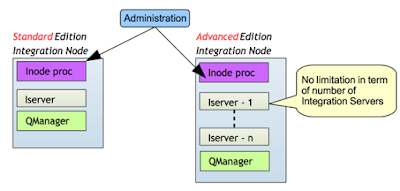
This overview will help to understand the main differences and implication of the different editions:
If you would like to know the limitation in term of license between these two modes, please find this information at the following post ibm-integration-bus-licensing-principle.
The difference stands in the number of Integration Server that can be defined per Integration Node.
Find at the following post the overview of the runtime if you are not familiar with the terms: a-view-of-ibm-integration-bus-runtime.

This overview will help to understand the main differences and implication of the different editions:
- Isolation: on advanced mode, you can have multiple integration server per Integration node. This means that you have a greater isolation when running on advanced mode as you can have flows deployed on separate integration server. You gain isolation in term of memory and address spaces. If one flow makes the process to crash, it will not affect flows deployed on other Integration Server.
- Administration: you can administrate only one integration node at a time. You can administrate multiple Integration Servers of one Integration Node through the same web user interface. If you have multiple Integration Node, you would need to have multiple UI. Also if you need to apply a configuration change that requires the process to restart, all the flows deployed in the Integration Node will be impacted.
- Queue Manager: in advanced mode all Integration Server of the Integration Node can access in binding mode the same queue manager associated with the Integration node (in V10, integration node doesn't required to have a queue manager - in some cases you would need to do so though). If you have multiple Integration Node it may be required to interconnect them.
- Scalability: as each Integration Server is one process, it may be possible to better distribute the load across available processors when running in advanced mode.
If you would like to know the limitation in term of license between these two modes, please find this information at the following post ibm-integration-bus-licensing-principle.


